 MMDFr.fr
MikuMikuDance: Free 3D Animation Software
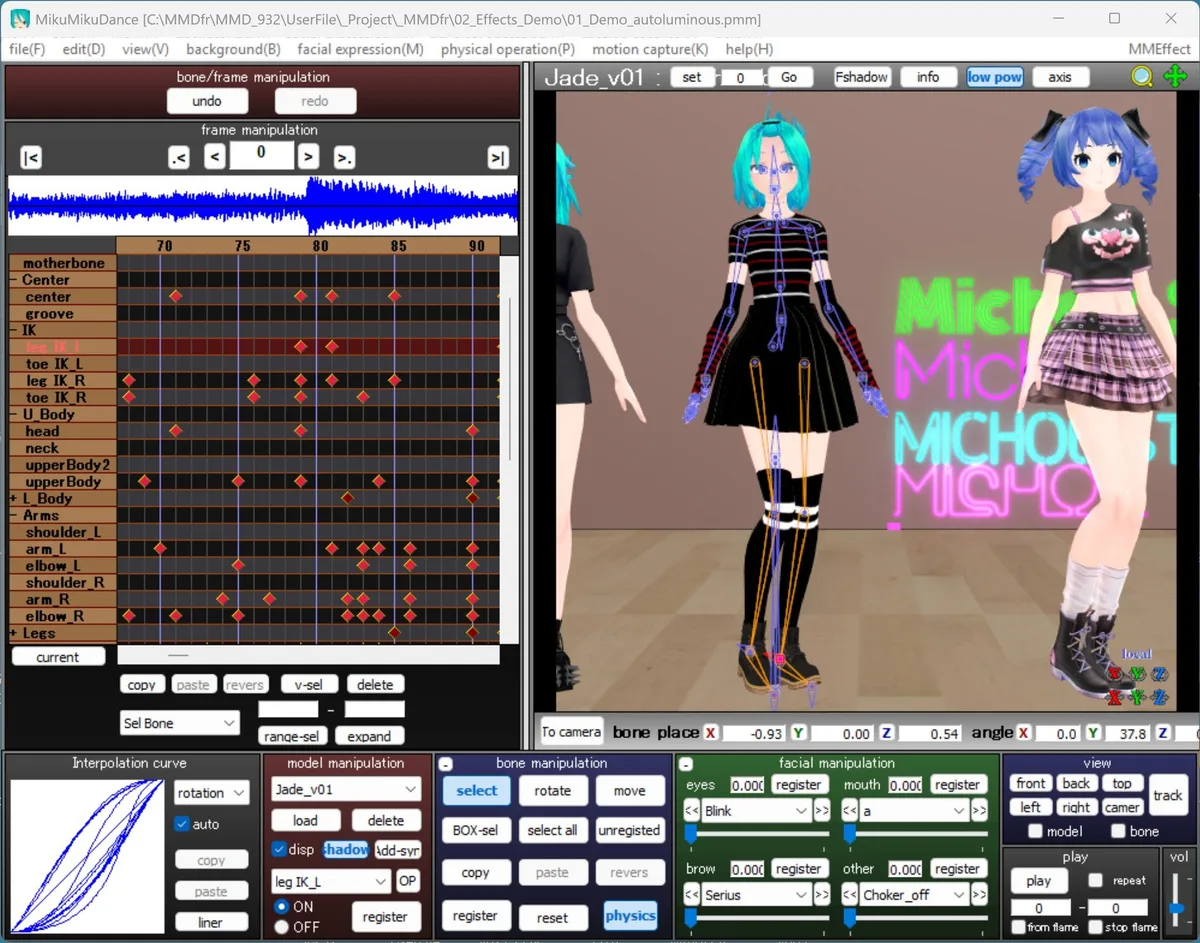
An inside look at the MikuMikuDance (MMD) interface, featuring its intuitive keyframe timeline, real-time 3D viewport, sound wave and control panels.
MikuMikuDance (MMD) is a free 3D animation software originally created by Yu Higuchi (Higuchi-M) to animate his preferred vocaloid character, Hatsune Miku. Today, it has evolved into a massive global community. With MMD, you can easily download and use thousands of free 3D models, motion files, stages, and special effects shared by creators worldwide.
What can you do with MMD?
- Load 3D character models (PMX / PMD format)
- Animate them using a keyframe-based timeline
- Add motion data (VMD files) in one click
- Set up cameras, lighting, and background stages
- Apply visual effects via MMEffect (MME) shaders
- Render to AVI video for sharing or post-processing
MMD is designed to be accessible: you can load a model and a motion file and get a result in minutes, without any 3D modeling experience. Mastering all its techniques and extensions takes time and passion, but the community makes it accessible.
File formats
| Format | Type | Description |
|---|---|---|
| .pmx / .pmd | Model | 3D character models with bones, physics, and morphs |
| .vmd | Motion | Keyframe animation data for models and cameras |
| .x | Stage | Background stages and accessories (DirectX format) |
| .wav | Audio | Background music, 44,100 Hz stereo |
| .avi | Video output | Raw render output (convert to MP4 with MikuVideo) |
| .mme | Effect | Post-processing shaders via MMEffect plugin |
Key features
- Keyframe animation: MMD uses a timeline with diamond-shaped keyframes. Select a bone, move it, and set a keyframe. Interpolation curves control how the motion flows between frames.
- Bones and physics: PMX models include a full bone hierarchy with IK (inverse kinematics) and physics simulation for hair, skirts, and accessories. All calculated in real time.
- Facial expressions (morphs): Models include sliders for expressions: blink, smile, mouth shapes, eye highlights. These can be keyframed like any other parameter.
- Camera and lighting: Camera position, angle, FOV, and lighting direction are all animatable on their own tracks.
- MMEffect (MME): A plugin that adds post-processing shaders: bloom, depth of field, cel-shading, ambient occlusion, and hundreds of community-made effects.
System requirements
| Minimum | Recommended | |
|---|---|---|
| OS | Windows 10 64-bit | Windows 11 64-bit |
| RAM | 4 GB | 8 GB or more |
| GPU | DirectX 9 compatible | Dedicated GPU |
| Disk | 120 MB (software) | 50 GB (with projects) |
How to install
Installing MMD manually can be frustrating for beginners. It usually requires downloading files from older Japanese websites, unblocking security DLLs, and dealing with cryptic Windows error messages.
We built MmdStart to solve this. It is a safe, one-click installer that handles everything automatically, setting up MikuMikuDance in your language without the stress.